1. Introduction
Large conference halls, boardrooms, showrooms and auditoriums demand display solutions that deliver high brightness, high resolution and dependable, repeatable image quality. Televisions and small projectors simply cannot fill a large space with a bright, sharp, evenly lit image, especially where ambient light cannot be fully controlled. For these demanding environments, an engineering-grade laser projector paired with a dedicated media player is the industry-standard answer.
KITOZER offers such a solution built around two complementary devices: the KZ-LP12000U engineering laser projector (12000 ISO lumens, WUXGA HD, laser light source) and the KZ-CTRL-U7RTX5060 custom media PC (Intel Core Ultra 7-class processor, NVIDIA RTX5060 Ti graphics and 32GB of high-speed memory). Together they form a complete, install-ready projection platform for large-scale corporate and institutional display.
This guide explains the engineering principles behind high-brightness projection, the detailed specifications of each component, typical deployment scenarios, installation and maintenance best practices, selection guidance, and answers to the most common purchasing questions. It is written as a technical and procurement reference for AV integrators, IT managers, conference-facility operators, showroom managers and corporate buyers.
Whether you are outfitting a new auditorium, upgrading a boardroom projection system, or building a permanent showroom display, the guidance in this document walks you through the decisions that matter: how much brightness you really need, whether to combine the projector with a dedicated media PC, how to place and mount the equipment for the best image, and how to keep the system reliable over years of daily use. The intent is that a non-specialist buyer can follow the material to specify, procure, install and operate a professional large-screen display with confidence, while an experienced integrator can use it as a structured checklist for quoting and project delivery.
2. Why a 12000-Lumen Engineering Projector
2.1 The Brightness Challenge in Large Spaces
Image visibility depends on the balance between the light the projector emits and the ambient light in the room. In a large hall with daylight, ceiling lighting or large windows, a modest consumer projector produces a washed-out image with poor contrast. Brightness, measured in lumens, is the primary specification that determines how effectively a projector overcomes ambient light. A 12000-ISO-lumen unit is in the engineering/professional class, designed to produce a visible, high-contrast image even under challenging ambient conditions.
Brightness requirements scale with screen size and ambient light. As a general rule, larger screens and brighter rooms need proportionally more lumens. The 12000-lumen class comfortably supports large screens — typically from roughly 150 inches up to very large wall projections — while retaining sharp, saturated colour and acceptable contrast, making it the right choice for serious corporate installations.
2.2 Why Laser Rather Than Lamp
Traditional lamp projectors use replaceable high-intensity lamps that degrade over time, change colour as they age, and need periodic replacement that interrupts service and adds cost. Laser projectors use solid-state laser light sources that deliver substantially longer life — in many cases tens of thousands of hours — with far more stable brightness and colour over that lifetime. Lasers switch on quickly, produce a consistent spectrum, and require minimal routine maintenance compared with lamps. For installations in professional venues where reliability and low running cost matter, laser is the clear choice.
2.3 Resolution, Contrast and Refresh
Resolution determines how much fine detail the image contains. The KZ-LP12000U provides WUXGA (1920×1200), a widescreen resolution with extra vertical pixels ideal for data, presentations, video walls and standard HD content. High contrast, specified at 50000:1, ensures deep blacks and bright whites coexist without washing out detail, which is important for text, charts and video. A 144Hz refresh rate supports smooth, flicker-free motion for video and dynamic content. Together these specifications describe a projector capable of crisp, professional presentation quality.
3. The KITOZER Solution Overview
The KITOZER large-screen display platform combines a high-brightness projector with a purpose-built media PC so that both the image engine and the content source are matched to the demands of large-venue display. The two components work together as an integrated system but can also be evaluated and procured independently.
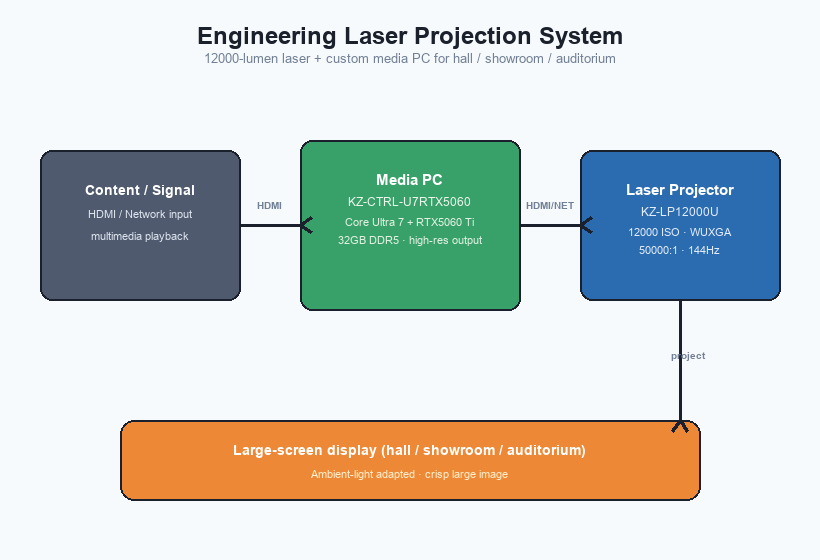
3.1 KZ-LP12000U Engineering Laser Projector
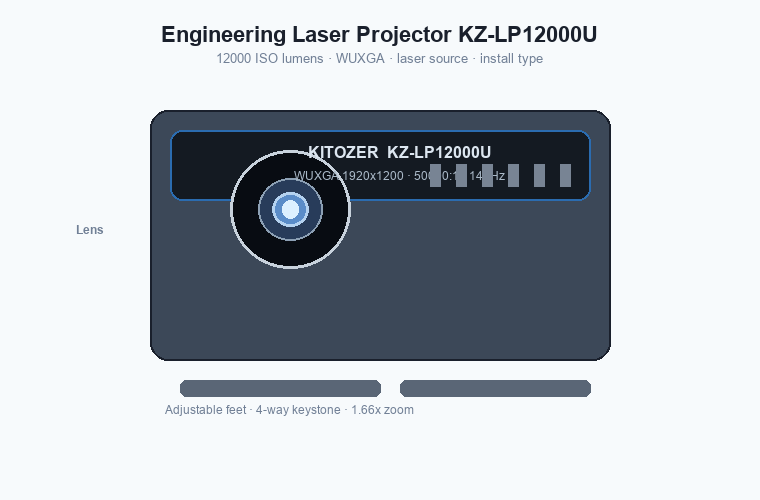
KZ-LP12000U is a high-brightness engineering laser projector rated at 12000 ISO lumens with WUXGA resolution, a 50000:1 contrast ratio, a 144Hz refresh rate and a 1.66× zoom lens with 4-way keystone correction. It is designed as an install-type unit — intended to be mounted and configured in a fixed position rather than moved between rooms. The laser light source provides long life and stable output, and the flexible optics allow installers to adapt the image to a variety of throw distances and mounting angles.
3.2 KZ-CTRL-U7RTX5060 Custom Media PC
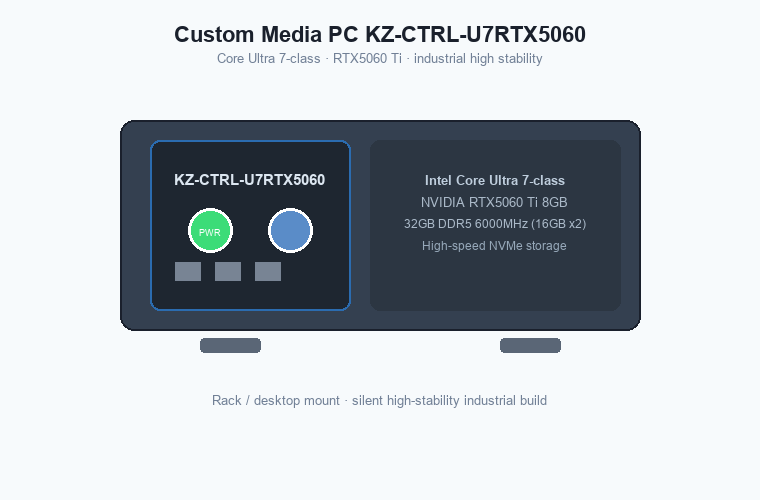
KZ-CTRL-U7RTX5060 is a custom-built media PC engineered for reliable, high-performance content playback and signal processing. It is built around an Intel Core Ultra 7-class processor and an NVIDIA RTX5060 Ti graphics card with 8GB of video memory, paired with 32GB of DDR5-6000MHz memory (16GB×2). This combination decodes and renders high-resolution, high-refresh-rate content without stutter, and provides the output bandwidth needed for large-format presentations, video walls and interactive content. Its industrial, high-stability design is intended for continuous professional operation.
4. Technical Specifications
4.1 KZ-LP12000U Engineering Laser Projector
| Parameter | Specification |
|---|---|
| Brightness | 12000 ISO lumens |
| Resolution | WUXGA 1920×1200 |
| Light source | Laser (long life, low decay) |
| Contrast ratio | 50000:1 |
| Refresh rate | 144Hz |
| Lens | 1.66× zoom |
| Image correction | 4-way keystone |
| Form factor | Install type |
| Application | Conference halls, showrooms, auditoriums, large venues |
4.2 KZ-CTRL-U7RTX5060 Custom Media PC
| Parameter | Specification |
|---|---|
| Processor | Intel Core Ultra 7-class |
| Graphics | NVIDIA RTX5060 Ti 8GB |
| Memory | 32GB DDR5 6000MHz (16GB×2) |
| Storage | High-speed NVMe SSD (as configured) |
| Enclosure | Industrial high-stability, install-ready |
| Role | Content playback and high-performance signal processing |
5. Deployment Scenarios
5.1 Conference Halls and Boardrooms
Executive boardrooms and large conference halls need bright, readable presentations with crisp text and graphics. A 12000-lumen projector supports large screens even when presentation lighting cannot be fully dimmed, and the WUXGA resolution renders detailed charts and documents clearly. The media PC ensures smooth playback of high-resolution files, embedded video and interactive presentations.
5.2 Showrooms and Exhibition Spaces
Showrooms often have generous ambient lighting to showcase physical products, yet still need compelling display for video, brand content and product animations. The high brightness of the KZ-LP12000U keeps projected content vivid in these conditions, while the media PC drives complex multimedia and looping content reliably for hours at a time.
5.3 Auditoriums and Training Facilities
Auditoriums and large training rooms place a premium on a large, uniform, visible image from the back of the room to the front. Engineering projectors with high lumen output and flexible optics are designed exactly for this. The install-type form factor suits permanent ceiling or rear mounts, and keystone correction accommodates challenging mounting angles.
5.5 Museums, Galleries and Exhibitions
Museums, galleries and temporary exhibitions use projection for ambient installations, informational displays, immersive experiences and event backdrops. The 12000-lumen output keeps projected content visible in curated spaces where lighting serves the exhibits as well as the projections, and the laser source’s stable colour is valuable when the same content must look consistent across a run of many hours or days. The install-type form factor suits the semi-permanent setups typical of these venues, while the media PC drives looping media, timed playback and multi-zone content reliably.
5.6 Houses of Worship and Community Halls
Houses of worship, community centres and sports halls often display lyrics, announcements and media to large audiences. Brightness is essential because these spaces are frequently lit for safety and occupancy rather than for projection. The KZ-LP12000U delivers the output needed for legible text and images across a wide audience area, and the low-maintenance laser source reduces the burden on volunteer or part-time facility staff.
5.7 Planning a Multi-Zone or Multi-Screen Deployment
Some larger facilities require more than one display zone. When planning multiple screens, consider a consistent brightness and colour strategy across the venue, plan a coherent signal-routing and switching topology, and agree on central control so that operators manage all zones from one interface. Document the topology so that maintenance and future expansion are straightforward.
5.8 Content, Scheduling and Operations
A reliable display system is supported by sound operational routines. Assign an owner for each venue who manages content scheduling, checks that media assets are correctly prepared at native resolution, and monitors playback during live events. Define easy fallback procedures so that an operator can quickly switch to an alternative source if a primary feed fails, keeping the display live and the event on schedule.
6. Installation Best Practices
Correct installation protects the investment in the projector and media PC and determines the quality of the final image. The following practices apply to most professional deployments.
- Plan the throw distance and screen size: Use the 1.66× zoom and the projector’s throw ratio to determine the correct mounting distance for your target screen size before installation.
- Choose a stable mount: For install-type units, use a purpose-built ceiling mount or rigid shelf rated for the projector’s weight, and verify it is securely anchored.
- Manage heat and airflow: Ensure sufficient clearance around ventilation grilles and route exhaust away from people. Confirm the ambient operating temperature is within specification.
- Provide clean power: Use a dedicated, surge-protected power circuit where possible to protect the laser source and the media PC from electrical noise and spikes.
- Use quality signal cabling: For long runs, use high-quality, shielded HDMI or the recommended network interface, and keep cable lengths within reliable ranges or use appropriate extenders.
- Apply keystone correction sparingly: Prefer physical alignment with the lens centreline; use keystone only for minor corrections, as excessive correction can reduce resolution and introduce artefacts.
- Calibrate image geometry and colour: After mounting, configure image geometry, focus and colour to match the screen and lighting conditions.
7. How Laser Projection Technology Works
7.1 Generating the Image
A laser projector generates its image by modulating laser light against an imaging engine — typically a DLP (digital light processing) chipset of micromirrors or an LCOS panel — and then projecting that modulated light through a lens onto the screen. The laser source supplies the illumination, while the imaging engine determines resolution, refresh and contrast. The combination of stable laser illumination and a high-quality imaging engine is what allows the projector to reach high brightness with consistent colour.
7.2 Colour and the Laser Advantage
Laser sources can be engineered to produce a wide, accurate colour gamut. Because the light spectrum is stable over the life of the source, colour reproduction stays consistent far longer than with lamps, which drift as they age. This is a significant advantage for brand-critical display in showrooms, where colour accuracy and consistency matter.
7.3 Brightness, Contrast and Dynamic Range
Brightness determines visibility; contrast determines how well detail survives between bright and dark areas of the image. The 50000:1 contrast ratio of the KZ-LP12000U allows deep blacks and bright whites in the same frame without flattening detail, which is essential for cinematic video, photographic content and data visualisation. The 144Hz refresh supports smooth motion, reducing visible flicker and judder on dynamic content.
7.4 Optical Flexibility: Zoom and Keystone
The 1.66× zoom lens gives installers a range of throw distances for a given screen size, simplifying placement in rooms with fixed architecture. Four-way (horizontal and vertical) keystone correction allows the image to be aligned when the projector cannot be placed perfectly perpendicular to the screen, which is common in ceilings and constrained spaces. Together, these features reduce installation complexity and improve flexibility.
8. Selection Guide: Which Components Do You Need?
The KITOZER platform is flexible, and the configuration you choose should match the venue and content requirements.
8.1 When the Projector Is the Focus
If you already own a suitable media source or are refreshing an existing projection installation, the KZ-LP12000U can be procured as the display core, providing high brightness, WUXGA resolution and install flexibility.
8.2 When Reliable Playback Matters
For venues where content changes frequently, sources are multiple, or playback must run continuously, the KZ-CTRL-U7RTX5060 media PC adds dependable, high-performance playback and signal processing. Its modern CPU and GPU handle demanding media without the dropped frames and buffering common to lower-end players.
8.3 Choosing the Complete System
For most new installations, a complete system — projector plus media PC — delivers the best result because both components are specified together for the target venue. It simplifies procurement, integration and support, and ensures the display source is matched to the display engine.
8.4 Considering Mounting and Accessories
Depending on the venue, you may also need a ceiling mount, appropriate cabling, a projection screen or surface, and possibly audio. These should be planned as part of the overall installation project.
9. Recommended Hygiene and Maintenance
- Clean the exterior and lens with a dry, soft, lint-free cloth. Do not use solvents or abrasive cleaners, and never touch the lens with your fingers.
- Keep ventilation grilles free of dust and debris. In dusty environments, schedule periodic professional cleaning to maintain thermal performance and image quality.
- Check that mounting hardware remains tight and that air inlet/outlet paths stay clear.
- Verify input signal and cabling connections periodically, and keep spare high-quality HDMI/network cables on hand.
- On the media PC, apply operating-system and driver updates through a controlled maintenance window, and scan for malware periodically if it connects to a network.
- Maintain a spare media PC or reliable backup source so that an unplanned hardware failure does not take a critical display offline.
- Log installation date, firmware versions and any service events to support planned maintenance and troubleshooting.
10. System Integration and Control
10.1 Centralised Control
In professional venues, projectors and media sources are often managed from a central control system or touch panel. The KZ-LP12000U is designed to integrate into such setups, with the connection architecture (such as network or RS-232 control, subject to the confirmed model) enabling power, source and image settings to be managed centrally alongside other room equipment.
10.2 Networking the Media PC
The KZ-CTRL-U7RTX5060 can be connected to a facility network to receive content, schedule playback and enable remote management. For security-sensitive environments, isolate the media PC on a dedicated VLAN with restricted access to reduce risk, and disable unnecessary services.
10.3 Supporting Multiple Sources
Boardrooms and halls frequently switch between laptop, video-conferencing and media inputs. Plan your switching and signal-routing in advance, using a matrix or switcher where multiple sources must be available, and configure the projector input selection to match.
10.4 Alerting and Monitoring
Where uptime is critical, integrate the projector and media PC into a simple monitoring and alerting routine so that lamp/source anomalies, connection failures or playback errors are detected and addressed promptly rather than discovered during a live meeting.
10.5 Laser vs. Lamp vs. LED: Choosing the Light Source
Projection light sources fall into three broad families, and understanding their trade-offs helps explain why laser is preferred for engineering installations.
10.5.1 Lamp Projectors
Lamp projectors use replaceable high-intensity discharge lamps. They are usually the lowest initial cost, but lamps degrade in brightness and shift in colour over their life, require periodic replacement (a consumable cost plus downtime), and generate more heat and noise. For permanent, high-use installations, the ongoing lamp expense and maintenance window are significant drawbacks.
10.5.2 LED Projectors
LED projectors use solid-state LED sources. They offer good life and energy efficiency and are compact, but they are generally limited in peak brightness compared with the highest-output professional units. LEDs suit many smaller and mid-range applications but may not reach the lumen levels needed for very large screens in ambient-lit venues.
10.5.3 Laser Projectors
Laser projectors combine the longevity of a solid-state source with the high output needed for large venues. They hold brightness and colour stability over tens of thousands of hours, switch on quickly, and offer a wide colour gamut. For engineering-class brightness and dependable long-term operation, laser is the recommended choice, which is why the KZ-LP12000U is built around it.
10.6 Resolution, Aspect Ratio and Content Planning
10.6.1 Matching Resolution to Content
WUXGA (1920×1200) handles widescreen presentations, video, spreadsheets and design software with a useful amount of vertical resolution. Standard 1080p HD content scales cleanly, and the extra vertical pixels benefit documents and data-dense slides. When planning content, design assets to the native resolution to avoid scaling artefacts and to keep text and fine lines sharp.
10.6.2 Aspect Ratio Considerations
Choose an aspect ratio that matches your primary content and screen. Widescreen 16:10 (as in WUXGA) is a good general choice for corporate work because it accommodates both 16:9 video and productivity content without excessive letterboxing. Confirm the screen dimensions and content format during planning.
10.6.3 Preparing Media Assets
For crisp results, prepare media at native resolution with high bitrate. Compressed or upscaled content will look soft on a large screen. Establish a simple asset pipeline so that presentations and videos are correctly formatted before they reach the media PC.
10.7 Signal Chain and Cabling
A high-brightness projector is only as good as the signal you feed it. For long cable runs, use certified, high-bandwidth cabling appropriate to the resolution and refresh rate you intend to drive, and keep runs as short as practicable. Where runs exceed reliable passive lengths, use an active extender or a network-based solution. Confirm that the media PC output and the projector input are matched in resolution and refresh settings to avoid blank screens or sub-optimal output.
10.8 Ambient Light, Screens and Viewing
Projection is a balance between the projector’s output and the environment. High brightness overcomes ambient light, but the viewing surface also matters. A high-gain screen improves perceived brightness and contrast, while a matte surface offers wider viewing angles. Consider the seating layout and viewing angles when choosing the screen, and plan window shading or lighting control where practical to protect contrast for text and video.
11. Cost-Benefit and Return on Investment
Large-venue projection is an investment, and it is worth considering the economics in the context of the venue’s purpose.
11.1 Long Service Life of Laser
Because the laser light source lasts for tens of thousands of hours with stable output, the projector avoids the recurring lamp-replacement cost and downtime of conventional projectors. Over a multi-year deployment, this can represent a meaningful operating-cost saving and higher reliability.
11.2 Reduced Maintenance Burden
A stable laser source and an industrial media PC reduce the frequency of intervention. Fewer service visits, less downtime and predictable operation translate directly into lower cost of ownership and better availability of the venue’s display.
11.3 Protecting the Investment in Content and Venue
A bright, reliable display protects the value of content presentation — in sales pitches, brand campaigns, training and events — by ensuring that content is always shown at its best. This is difficult to quantify but is often the most important benefit to a business.
12. Frequently Asked Questions (FAQ)
12.1 Is 12000 lumens suitable for a bright showroom?
Yes. 12000 ISO lumens is an engineering-class brightness intended to remain visible under challenging ambient lighting, such as showrooms and daylight-filled halls, where consumer projectors would wash out.
12.2 What does WUXGA mean?
WUXGA is a wide-screen resolution of 1920×1200 pixels. It has more vertical pixels than standard 1080p HD, making it well suited to widescreen presentations, spreadsheets and detailed graphics.
12.3 Why choose laser over a lamp projector?
Laser sources last far longer, hold brightness and colour more consistently, switch on quickly, and reduce maintenance and running cost compared with replaceable lamps.
12.4 What is the role of the media PC?
The media PC provides high-performance content playback and signal processing. Its modern CPU and GPU handle high-resolution, high-refresh-rate and complex multimedia sources without stutter, which is especially important for continuous or interactive display.
12.5 What does install type mean?
Install type means the unit is designed for semi-permanent mounting (ceiling or shelf) as part of a fixed installation, with the flexible zoom and keystone to accommodate the venue, rather than for frequent repositioning.
12.6 Can the projector be used without the media PC?
Yes. The projector accepts standard display sources (such as HDMI) independently. The media PC is an optional enhancement for reliable, high-performance playback and processing.
12.7 What maintenance is required?
Routine care is light: keep ventilation clear, clean the lens gently, and check connections. Periodic professional cleaning is recommended in dusty environments. The laser source avoids the lamp-replacement routine of conventional projectors.
12.8 How long does the laser source last?
Laser light sources are rated for many tens of thousands of hours of operation. Confirm the exact rating from the model datasheet, as it depends on operating conditions and settings.
13. Ordering & Configurations
The solution is offered in flexible configurations. A typical deployment comprises one KZ-LP12000U projector and one KZ-CTRL-U7RTX5060 media PC, with additional items such as mounts, cabling, screens and audio configured per project. The following table shows an indicative configuration in US dollars, for reference only.
Indicative Configuration — USD (for reference only)
| Item | Model | Qty | Unit Price (USD) | Amount (USD) |
|---|---|---|---|---|
| 12000-lumen engineering laser projector | KZ-LP12000U | 1 | US$8,169.01 | US$8,169.01 |
| Custom media PC (Core Ultra 7 / RTX5060 Ti / 32GB) | KZ-CTRL-U7RTX5060 | 1 | US$1,802.82 | US$1,802.82 |
14. Troubleshooting Common Issues
- Image is dim or washed out: Check that the projector is not in an eco/low-power mode, verify the input brightness and content, and confirm screen gain and ambient lighting. In bright spaces, add shading or lighting control.
- Image is soft or out of focus: Adjust the lens focus, confirm the projector is at the correct distance for sharp focus, and ensure the source resolution and refresh match.
- Image is not rectangular: Use the 4-way keystone for minor corrections, but prefer physical alignment of the lens centreline to the screen. Large corrections should be minimised.
- No signal or blank screen: Check cabling, confirm the correct input is selected, verify the source output, and test with a known-good cable and source to isolate the fault.
- Playback stutters or drops frames: Confirm the media PC has updated drivers, is not overloaded, and the content is encoded for the target output. Reboot and retest in a maintenance window.
- Colour looks off: Re-run colour and geometry calibration, check for dust on the lens, and verify the projector has not been inadvertently set to a colour-restricted mode.
- Overheating or fan noise: Check ventilation clearance and filters, confirm ambient temperature is within specification, and schedule professional cleaning if dusty.
15. Extended FAQ
15.{n} What size screen can a 12000-lumen projector drive?
With 12000 ISO lumens, the projector comfortably supports large screens from roughly 150 inches upward, and can drive very large wall projections depending on room conditions and screen gain. The practical maximum depends on ambient light and desired brightness per unit area.
15.{n} Can I run the system for long periods or continuously?
The laser source is designed for long operating life, and the industrial media PC is built for sustained operation. For around-the-clock use, plan ventilation and maintenance, and confirm operating conditions with the datasheet.
15.{n} Is professional installation required?
For an install-type unit in a ceiling or permanent mount, professional installation is recommended to ensure correct positioning, safe mounting, proper signal routing and calibration.
15.{n} What power and heat considerations apply?
Engineering projectors consume more power than consumer units and dissipate heat accordingly. Ensure the venue’s electrical and HVAC systems are sized for the equipment, and keep ventilation paths clear.
15.{n} Can I connect my laptop directly?
Yes. The projector accepts standard display sources; connect your laptop to the appropriate input and select the source. For the best experience with multiple sources, plan switching in advance.
15.{n} How do I handle firmware and updates?
Apply manufacturer firmware and driver updates through a controlled maintenance window, following the documented procedure, and verify operation after each update.
15.{n} Does the system include a screen and audio?
The standard configuration covers the projector and media PC. Screens, mounts, cabling and audio are typically configured per project; contact KITOZER to include them in your quotation.
16. Glossary of Key Terms
- Lumen / ISO lumens: A measure of luminous flux and of perceived brightness; higher lumens mean a brighter projected image.
- WUXGA: A widescreen resolution of 1920×1200 pixels.
- Contrast ratio: The ratio between the brightest white and darkest black a projector can display.
- Refresh rate (Hz): The number of times the image is redrawn per second; higher rates give smoother motion.
- Zoom ratio: The range of throw distances supported for a given image size, expressed as a multiplier (for example 1.66×).
- Keystone correction: Adjustment of the image geometry to compensate for projector angle relative to the screen.
- Throw distance: The distance from the lens to the screen.
- DLP / imaging engine: The technology that modulates light to form the image inside the projector.
- Media PC: A dedicated computer for content playback and signal processing in a display system.
17. Normative and Good-Practice References
The following references support good practice for planning and installing professional projection systems:
- Published lumen and resolution measurement standards used by reputable projector manufacturers.
- AV industry best-practice guidance on signal cabling, resolution matching and venue installation.
- Safety and electrical installation guidance applicable to professional AV equipment in commercial buildings.
- Manufacturer datasheets and installation manuals for the KZ-LP12000U and KZ-CTRL-U7RTX5060.
Always confirm the specific control interfaces, throw ratios, power and environmental tolerances against the model datasheet for the exact units supplied.
18. A Step-by-Step Deployment Playbook
To translate this guide into action, the following sequence outlines how to bring a KITOZER projection system into service.
- Define the venue and content. Confirm the room, screen size, viewing distance, ambient light and primary content type.
- Determine brightness and resolution needs. Verify that 12000 lumens and WUXGA meet the screen size and content requirements.
- Select components. Choose the projector, and decide whether the media PC is required for playback and processing.
- Plan mounting and throw. Use the zoom range and throw ratio to set the mounting position and distance.
- Arrange power, cabling and control. Plan power, signal routes and any central control integration.
- Install and align. Mount the unit, connect sources, and align the image with focus and minimal keystone.
- Calibrate image quality. Set brightness, contrast, colour and geometry for the venue.
- Test with representative content. Run the media PC with real presentations or videos to confirm performance.
- Establish maintenance. Schedule cleaning, updates and periodic checks, and log service activity.
Following this sequence helps ensure a smooth installation and dependable, long-term performance of the large-screen display.
19. Conclusion
A large-screen display is more than a projector on a shelf: it is the surface on which an organisation communicates its ideas, products and events. Choosing equipment that is bright enough, reliable enough and easy enough to maintain is what separates a professional installation from a recurring source of frustration. The KITOZER solution addresses those needs directly: the KZ-LP12000U provides the brightness, resolution and image quality that large, ambient-lit venues demand, while the laser light source removes the recurring lamp cost, colour drift and maintenance downtime of older technology. The KZ-CTRL-U7RTX5060 media PC adds dependable, high-performance playback so that the content and the display engine work together as one coherent system.
For large conference halls, showrooms, auditoriums, training facilities and control centres, an engineering-grade laser projector combined with a reliable media PC is the proven answer to bright, sharp, dependable large-screen display. The KITOZER KZ-LP12000U and KZ-CTRL-U7RTX5060 provide a matched, install-ready platform: high brightness and WUXGA resolution from a long-life laser source, plus high-performance playback from an industrial media PC. With flexible optics, low maintenance and a clear configuration path, the solution is well suited to serious corporate and institutional deployments.
For assistance selecting the right configuration, placement, mounting or additional accessories for your venue, or to request a formal quotation, pricing documentation, or technical datasheets for the KZ-LP12000U and KZ-CTRL-U7RTX5060, please contact the KITOZER sales team through the channels below. The team can help you size the system to your space, confirm mounting and signal requirements, and provide certified documentation for procurement.